Atlassian Intelligence
Platform design across Atlassian’s AI admin surface: the governance layer that decides whether 60,000 enterprise admins turn AI on. Multiple workstreams, different eng teams per surface, one admin experience stitched across them. Rovo MAU 20K to 60K.
The brief
Atlassian’s AI strategy only works if enterprise admins turn it on. This case study is about the admin surface that made that decision defensible: the layer a CISO, IT admin, and compliance officer review together before any of their 50,000 users sees a prompt box.
Specifically: Rovo admin enablement during the beta program, the AI Default-On experience, UGC Data Governance admin controls, and the value management surfaces that let admins see what AI was doing inside their tenant. These are the parts of AI that don’t photograph, where success looks like an admin saying “I have the controls I need” and failure looks like a Fortune 500 customer pulling out of a pilot.
Two IC roles inside Atlassian’s Enterprise Platform team across 2023 to 2025. Senior Product Designer on return from a management year, picking up Rovo beta admin enablement, the initial Default-On rollout, and policy transparency. Lead Product Designer from late 2024 on the AI Trust, Data Use and Controls team, taking Default-On to enterprise scale alongside Rovo consumption dashboards, UGC Data Governance admin controls, and AI Trust vision work. The management year in between was spent forming the Regulated Industries Design team, which has its own case study.
Outcomes the team landed, some of which I can talk about publicly.
These numbers sound modest in a marketing deck and matter a lot inside the business. Enterprise AI activation isn’t a viral consumer growth curve. Each percentage point represents thousands of admins making a deliberate decision to turn AI on for their organisation after reviewing the controls. The named AI Access Rule feature was later pulled from the public roadmap, but the outcome still landed through the broader Default-On and UGC work that carried its intent forward.
What the work involved
Most AI design discussion right now focuses on the consumer interface: prompt boxes, suggestion chips, chat surfaces, the parts users see and react to.
The team’s work was the layer underneath. The part where an enterprise admin decides whether AI is allowed to run inside their organisation, what data it can touch, and which tenants it shows up in.
If that layer isn’t right, the consumer interface doesn’t get to matter, because nobody is allowed to use it.
Several workstreams inside AI admin, each owned by different engineering teams, all experienced by one admin. The gap between those two things is where a lot of the design work sat.
Rovo admin enablement (beta). The beta experience specifically: the admin-hub setup and configuration flow that gated Rovo into an organisation during the beta program. Rovo only showed up for end users after an admin turned it on, and this was the surface that decided whether that happened. Andy White’s peer review frames it as “Rovo beta signup and admin hub configuration experience.”
AI Default-On. The policy flip that switched Atlassian Intelligence from opt-in to on-by-default across Enterprise and Premium. A rough change for enterprise admins if it landed badly, so the design job was stitching a coherent spine across every surface it touched: the admin-hub opt-out flow, per-product override controls, pre-change and post-change customer emails, the Product Updates release-note entry, in-product notifications, and the audit-log entries recording who opted out and when. Different eng teams owned each surface, but admins experience one event. Default-On looks like one toggle from the outside. Shipping it responsibly is a cross-team coordination problem where someone has to hold the whole experience while the org ships the parts, and that was my seat on this one. It shipped to 60,000+ Enterprise and Premium customers. 15% of enterprise and 3% of premium used the opt-out. Honest telemetry, logged.
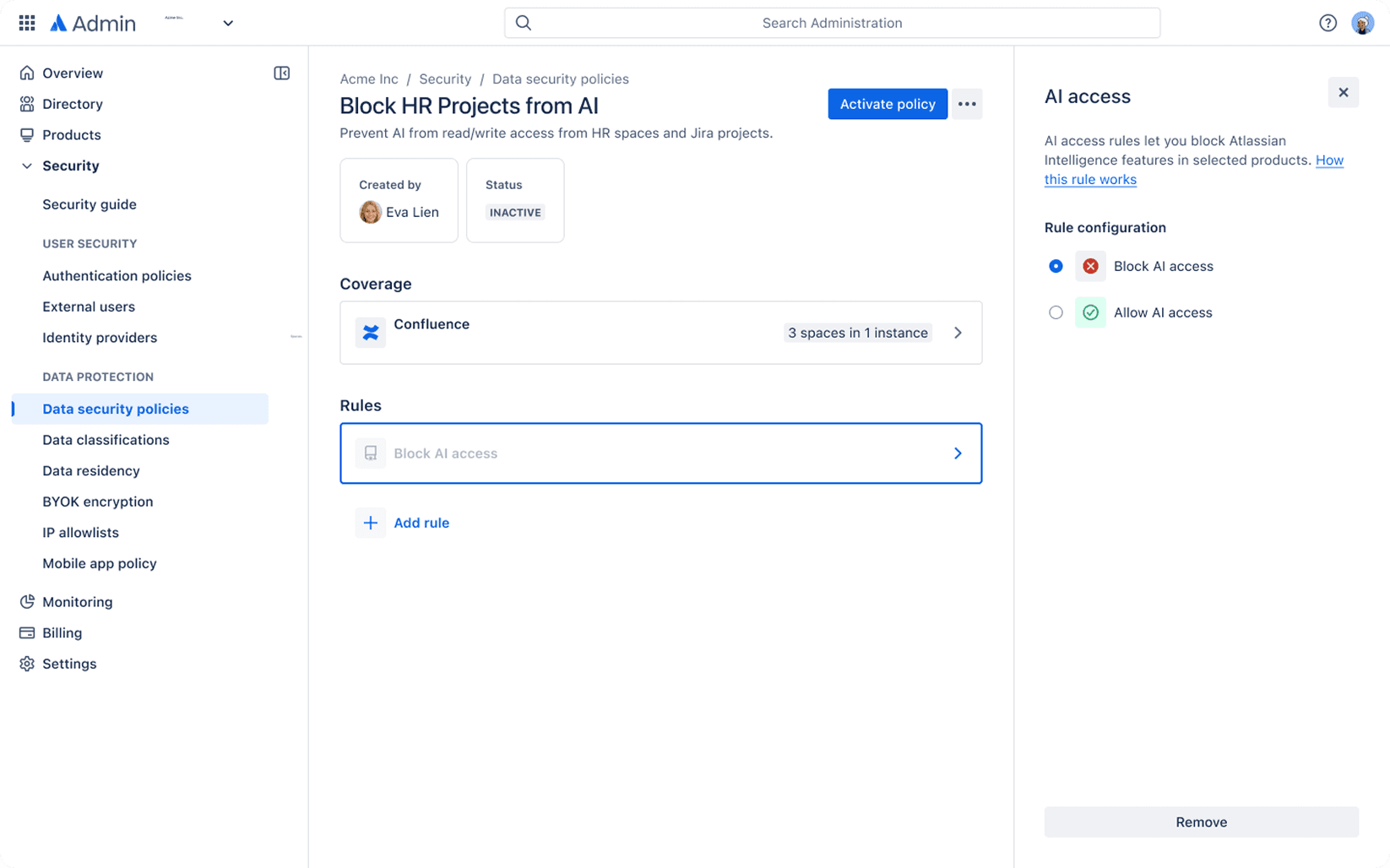
AI Access Rule. A policy primitive for blocking AI access per product, space, and user group. The named feature was later pulled from the public roadmap, but the +3.4% OKR lift on AI enablement landed through the Default-On and UGC work that carried its intent forward.
Value management and consumption. Dashboards that let admins see what AI was doing inside their tenant, framed as a lifecycle: Hire, Onboard, Manage. Covered in its own section below. The Rovo consumption work transitioned to another designer on the team before I moved on.
Adjacent work is covered in companion case studies: UGC Data Governance (the underlying data-use policy controls), HIPAA BAA Eligibility (the regulated-industries unlock), and Enterprise Grade Transparency (the six-capability work and Trust Center). Those surfaces interlock with AI admin but each has its own page.
Several workstreams, each owned by different engineering teams, all experienced by one admin. That gap is where a lot of the design work sat.
What made this hard
Atlassian Enterprise Platform is a layered architecture. Admin Hub sits above roughly thirty product teams who ship their own admin surfaces on their own cadences. AI admin touched at least five of those teams at any given time, each with its own OKRs, and none of those OKRs were “the admin has a coherent experience.”
Coherence was the design seat. Engineering teams shipped their pieces correctly on their own terms. Whether those pieces added up to something an admin could use was the question nobody else in the building was accountable for.
The Default-On rollout is the clearest example. Switching Atlassian Intelligence from opt-in to on-by-default touched ten engineering-owned surfaces: admin hub settings, per-product opt-out, policy override, pre-change and post-change customer emails, Product Updates release notes, in-product notifications, audit log entries, API surface, and downstream reporting. None of those teams reported into each other. No one had the authority to say “we’re not shipping until this reads as one event.” Design held that line through relationships, facilitation, and the document work Ann Ou names in her peer review: “created documents and facilitated discussions that helped raise awareness on the technical and UX challenges.”
Holding the cross-surface view in practice is a lot of that kind of work. More coordination than craft on any given week. A lot of it was getting five teams to agree on a sequence, a naming convention, and a rollback behaviour before any UI existed.
None of those OKRs were “the admin has a coherent experience.” Coherence was the design seat.
Admin value management: Hire, Onboard, Manage
- 01Hire
- 02Onboard
- 03Manage
Concept work, not shipped. Included because it shows the thinking, not just the pixels.
The product strategy for admin value management was a three-stage lifecycle: Hire AI into the org, Onboard it into the right products and spaces, Manage it in flight. A clean strategy on a slide. The design job was translating it into an admin experience that actually felt like one coherent journey rather than three disconnected screens.
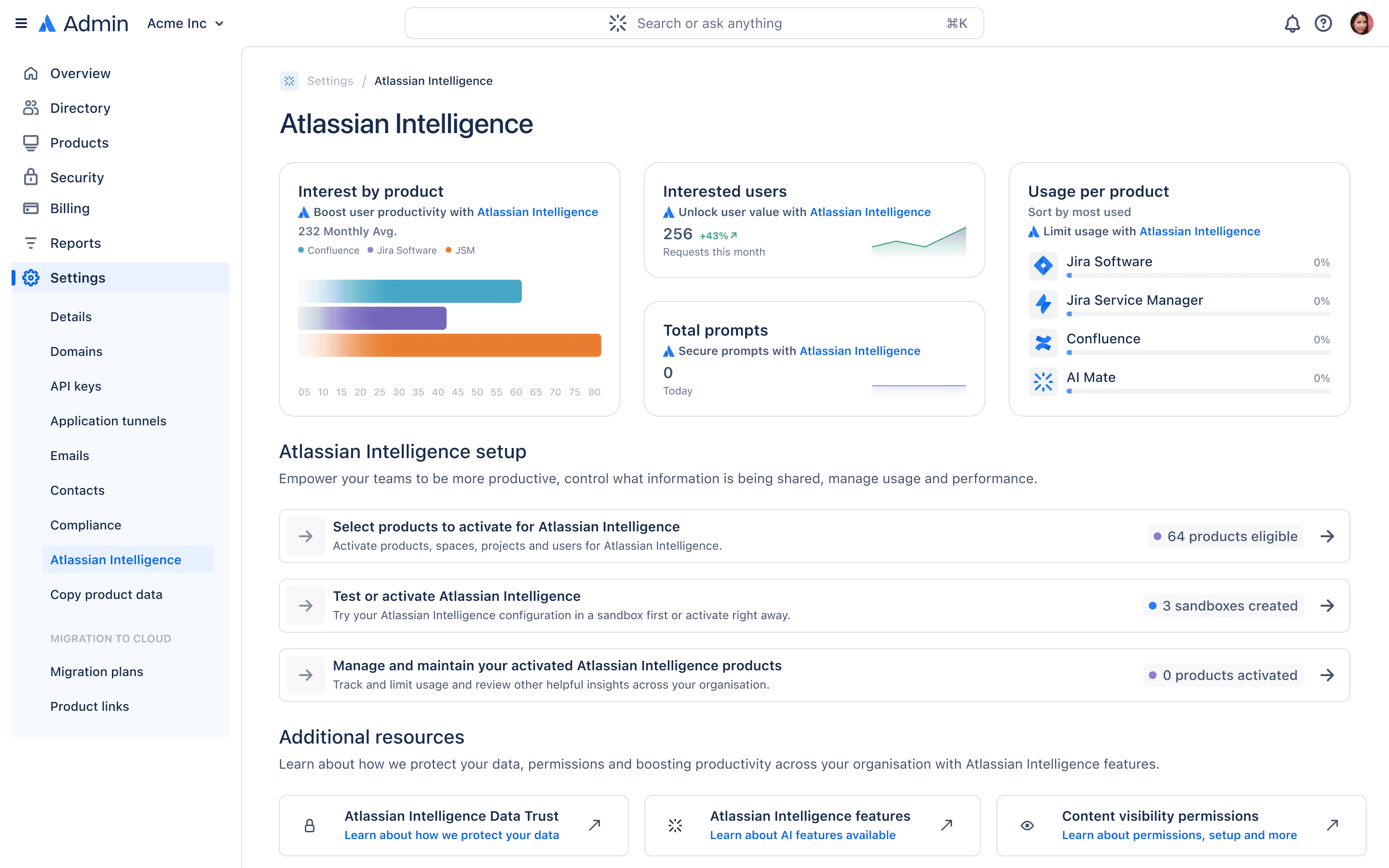
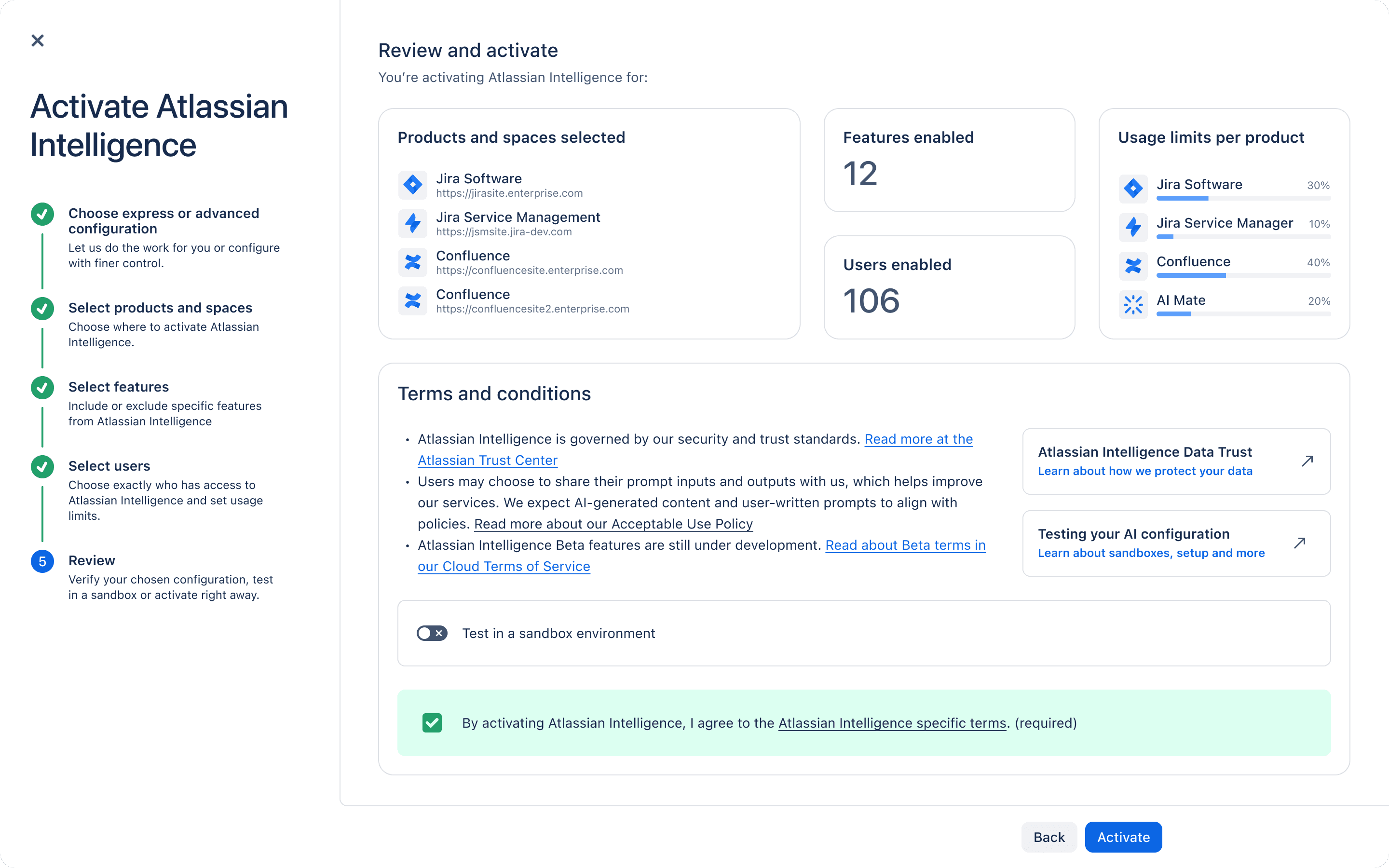
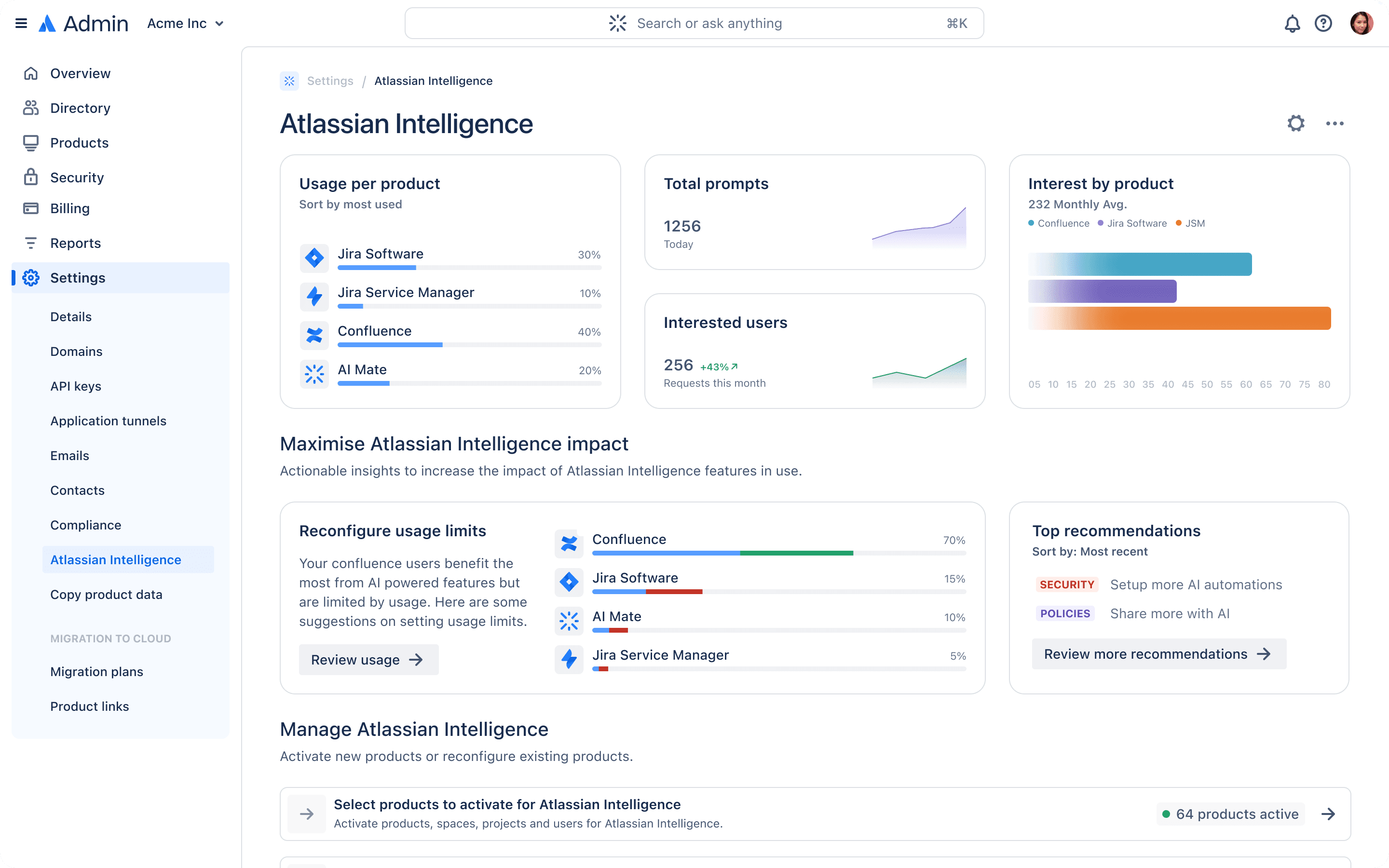
Two concept frames from that work. The activation wizard breaks enabling into deliberate steps (products and spaces, features, users, review) with an explicit sandbox toggle so admins can test before they commit. The manage dashboard pulls usage limits, top recommendations, and reconfiguration into one surface so the ongoing operating question, “is this working, and what should I tune,” has one answer, not five. The setup-landing frame is the same surface shown at the top of this case study, leading with evidence, interest, users, prompts, and usage, before asking an admin to make a call.
The point of this work wasn’t the specific UI. It was demonstrating that a PM strategy built around a lifecycle could become an admin experience that actually behaved like one. The shipped surfaces inherited this thinking piece by piece.
A few things I came to believe on this work
Held loosely, learned slowly, and only fully in hindsight.
The admin is the cross-surface user. Engineering teams deliver features; admins deploy, configure, audit, and defend those features to their own internal stakeholders. A feature that’s locally excellent but incoherent with the rest of the admin console can still fail the admin even when every eng team has hit their OKR. Part of the design work is holding the admin’s view of the whole while engineering holds the view of the part.
Trust showed up for us as a design problem before it was a marketing one. You can’t tell an enterprise customer to trust AI. What you can do is give them a control surface they can use to satisfy themselves the system behaves the way you say it does. A lot of this work was that.
Defaults carry weight. Every default setting in an admin panel is a quiet statement about the customer you’re designing for and the risk profile you’re comfortable with. The team spent a disproportionate amount of time on defaults, and I think they mattered more than the visible UI by a fair margin.
Correct is a conversation with engineering. Abstractions, status models, promotion semantics: those questions get answered together before any interface decisions are really defensible. Specs that skip the engineering conversation don’t tend to survive contact with an admin who reads admin tooling for a living.
The audit log is part of the product. When a regulated customer’s compliance team asks “show me what AI did in our tenant last quarter,” the answer should be a single legible export, not a forensics project. We treated the audit trail as a primary surface rather than a footnote.
Legibility over sophistication, when we could manage it. Enterprise AI controls are inherently complex, and the job isn’t to hide that complexity, it’s to make it navigable for someone who doesn’t have all day. Plain language, clear hierarchy, and accepting that some surfaces are going to be dense and should be designed to be scannable rather than minimal.
The team spent a disproportionate amount of time on defaults, and I think they mattered more than the visible UI by a fair margin.
How the team saw this work
Case studies tend to read like solo-IC work because that’s how the format wants to read. Worth correcting here. A lot of the work on this surface was unblocking other designers, writing handover docs, and holding the cross-surface view while engineering teams shipped their pieces. The peer reviews say it more directly than I would.
From Tim Yeh, Director of Product Management for Enterprise Trust and Security: “He had to design for two of my teams: AI Admin Control and Data Use and Policy. He probed the PMs to understand what the admins were trying to do, then proposed a unified view of how all this could work together. He received pushback on the design but explained his thinking, collaborated and compromised, and was able to deliver designs that both teams thought made sense.” That unified-view call is the cross-surface work in one sentence.
From Ann Ou, on the AI Trust work: “Cam played a big part in unblocking the design work in AI Trust. He engaged with the cross-functional team early and regularly to understand the business complexity. He also created documents and facilitated discussions that helped raise awareness on the technical and UX challenges with bridging Data Policies and AI Access Rule. When additional designers joined the space, he helped them navigate the dynamic environment and clarified constraints, and overall enabled the team to deliver many features on time.”
From Andreea Hrincu: “Cam created a handover page for me when I joined the team, and was patient in walking through and explaining the space we operate in. He was there to steer the initial designs of the Rovo consumption charts. As a result, I was able to jump headfirst into the new space and deliver my work quickly. Cam’s calmness is a huge strength in a program that frequently changes direction.”
From Jessica Gahan: “Cam leads product design excellence through his deep knowledge of APX and admin hub UX standards, in combination with his strong mentorship skills.”
From Daniel Kim, former Design Manager on Trusted Change: “a sincere thank you for your exceptional design leadership, ownership and mentorship. Your ability to lead with passion and positivity has shaped our direct team’s success in Trusted Change and Trust Foundations, and Enterprise Trust as an entire design org.” That kind of cross-team scope is the part that doesn’t photograph, but shows up in the outcomes.
And concretely, during this period: mentoring a junior designer (Natasha Yeh) from P40 to P50; three designers joining AI Trust and Data Governance programs through onboarding work we put in together (Andreea Hrincu, Vishnupriya Bhandaram, Carlee Potter); UGC Data Controls being in a solid enough state when I took time off that Jason Calleiro stepped in with minimal disruption to the program, per Ann Ou’s manager write-up. That kind of handoff quality is a deliberate output, not an accident.
I’m including this here rather than burying it in a resume bullet because a lot of senior design at this level is about the people around you getting more done. That’s the part that doesn’t photograph. The metrics above are the easy evidence. The peer quotes are the harder one.
He probed the PMs to understand what the admins were trying to do, then proposed a unified view of how all this could work together.
Tim Yeh, Director of Product Management, Enterprise Trust & Security
What changed
Over two years on this surface area, the qualitative changes mattered as much as the metric movement.
Enterprise AI activation became defensible. When customers asked “why should we turn this on for our 50,000 users,” there were real answers in the product by the end, not just in the sales deck. The controls existed, the audit trails worked, and the defaults held up under review.
The admin experience stopped feeling fragmented. When I returned to this surface, each eng team owned a slice and admins got several disconnected stories. By the time I left, the admin hub, opt-out flow, access rules, and consumption dashboards read as one experience even though they were still being shipped by different teams. That coherence is a design output more than a platform one.
Regulated industries became a viable market. When the AI admin work started, regulated customers were a hard sell because the trust and governance story wasn’t yet built into the product. By the time I left, that story was native to how the products worked rather than bolted on top of them.
The team grew muscle for this kind of work. Trust and governance design was a niche capability when I joined the AI admin surface, and by the time I moved on it was an established discipline with a pipeline of designers carrying it forward.
What I’d want someone to take away
One thing that’s stuck with me from this work. Most AI products that struggle in enterprise don’t struggle because of the AI. Enterprise software has a long-running social contract with admins around control, audit, and predictability, and a lot of AI products have quietly broken that contract in a way a CISO will eventually find.
The interesting design work in enterprise AI right now is rebuilding that contract. Controls that earn trust over time rather than asking for it up front. Audit and governance treated as primary surfaces. The admin recognised as the actual customer, because they’re the one deciding whether the AI ever runs.
The same pattern shows up in other places. Internal developer platforms, admin platforms, governance surfaces: a specialist user who knows the domain better than the designer walking in, a surface owned by multiple engineering teams, and a designer whose job is coherence as much as new features.
That’s the work I did at Atlassian. I’d do it again, with sharper instincts, faster, and with a clearer eye for how much of what landed was the team around me doing the parts I never had to solve.
The admin is the actual customer, because they’re the one deciding whether the AI ever runs.
A note on what’s visible here
Most of this work is NDA-bound. The screenshots above are from shipped Atlassian Admin product. The deeper design decisions that actually drove outcomes (defaults, hierarchy, copy, audit surface design) don’t photograph. They show up in the numbers.
For the adjacent surfaces the admin interlocks with, see the companion case studies: UGC Data Governance, HIPAA BAA Eligibility, Enterprise Grade Transparency, and the Regulated Industries Design team. They cover workstreams I was involved in but aren’t the focus here.
I’ve been consistently impressed with you as a designer and team member. Thank you for all that you’ve done for our customers, this team, and Atlassian.